Build a Browser Gomoku with Heuristic AI and Exact Win Detection
 by ahsan
July 02, 2026
7 min read
by ahsan
July 02, 2026
7 min read
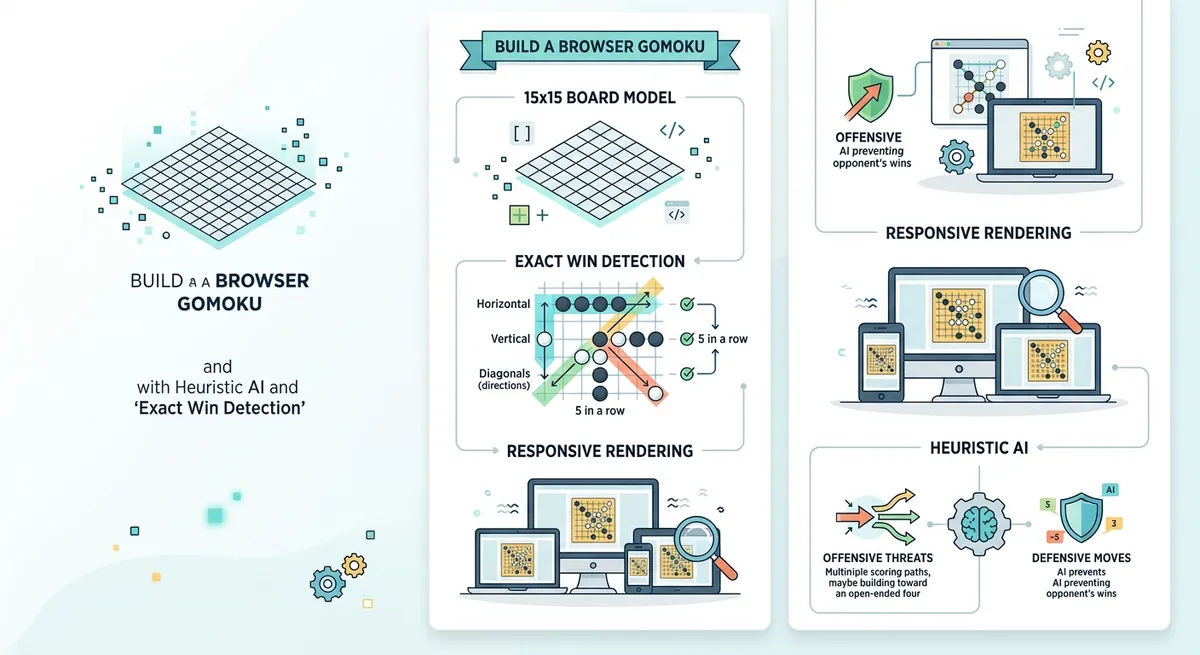
When you want “play right now” AI—without servers
Picture this: you open a project folder and there’s basically nothing in it. No framework. No existing app to extend. Yet you want a working Gomoku (Five-in-a-Row) game in the browser—one where you can place stones, the AI responds with smart moves, and the game reliably announces a win.
That scenario is a perfect match for a self-contained approach: a single HTML page plus a little JavaScript for game logic and CSS for rendering. The end result should work by opening index.html directly in a browser, with zero network dependencies.
But the real challenge isn’t drawing a board—it’s correct win detection and an AI that feels intentional rather than random.
The pieces: board, rendering, turns, and rules
Before touching code, it helps to name the responsibilities in a Gomoku app:
- Board state: a data structure that records which cells contain a stone for the player, the AI, or nothing.
- Rendering: drawing the board and placing stones in the right cells.
- Turn handling: tracking whose move it is, validating moves, and switching turns.
- Win detection: determining whether the last move created five consecutive stones in any direction.
This separation matters because win detection should never depend on the UI. The UI can lag; the state cannot. When you keep them cleanly separate, bugs become easier to find.
Board state as a 15×15 grid
Gomoku is played on a grid—commonly 15×15. Each cell can be in one of three states:
0: empty1: player (e.g., black)2: AI (e.g., white)
In JavaScript, a simple way is a 2D array:
const SIZE = 15;
const EMPTY = 0;
const PLAYER = 1;
const AI = 2;

let board = Array.from({ length: SIZE }, () => Array(SIZE).fill(EMPTY));
This “array of arrays” model is beginner-friendly and makes win detection straightforward because you can index by row/column.
Rendering as a mirror of state
Rendering should be a visualization of the board array. A common technique is:
- Create a grid on the page.
- For each non-empty cell, draw a stone (often using a positioned element).
- On every move, re-render only what changed—or re-render everything if performance is still fine.
A 15×15 board is small enough that full re-rendering is typically fast on modern browsers.
Turn handling and move validity
Turn handling sounds trivial until you hit edge cases:
- Clicking an occupied cell shouldn’t do anything.
- After a win or draw, clicks should stop changing the board.
- The “first move” should trigger the correct response (either player goes first or AI responds first).
A typical loop looks like:
- Player clicks a cell.
- Validate it’s empty and the game is active.
- Place the player stone in
board. - Check win/draw.
- If game continues, ask the AI for a move.
- Place AI stone and repeat checks.
That structure keeps your game flow predictable.
Win detection: the exact logic that makes Gomoku feel “fair”
Win detection is the heart of the game. A player wins when a line contains five consecutive stones (not necessarily exactly five—more stones in a row can still include a five-in-a-row).
Directions to check
Five-in-a-row can happen in four directions:
- Horizontal (left → right)
- Vertical (top → bottom)
- Diagonal down-right
- Diagonal down-left
To detect it, you usually start at the last placed stone and scan outward in each direction.
Here’s the idea in plain language: if you count consecutive stones of the same type in both directions combined, and that count reaches 5 or more, the player wins.
A robust helper: count consecutive stones
Conceptually:
- Pick a direction vector
(dr, dc). - Walk forward while stones match.
- Walk backward while stones match.
- Total = forward count + backward count + 1 (for the starting cell).
Once total ≥ 5, you can also collect the exact cells in the winning line so you can highlight them.
Example code sketch:
function inBounds(r, c) {
  return r >= 0 && r < SIZE && c >= 0 && c < SIZE;
}

function countInDirection(r, c, dr, dc, player) {
  let count = 0;
  let rr = r + dr;
  let cc = c + dc;
  while (inBounds(rr, cc) && board[rr][cc] === player) {
    count++;
    rr += dr;
    cc += dc;
  }
  return count;
}

function checkWinFrom(r, c) {
  const player = board[r][c];
  const directions = [
    [0, 1],   // horizontal
    [1, 0],   // vertical
    [1, 1],   // diag down-right
    [1, -1],  // diag down-left
  ];

  for (const [dr, dc] of directions) {
    const forward = countInDirection(r, c, dr, dc, player);
    const backward = countInDirection(r, c, -dr, -dc, player);
    const total = 1 + forward + backward;

    if (total >= 5) {
      return true;
    }
  }
  return false;
}
This is the logic behind “detect winning conditions.” In a complete game, you’d return not only true, but also the winning cell list so the UI can highlight the line.
Why highlighting matters
Highlighting the exact five-in-a-row line does two things:
- It confirms that win detection isn’t off-by-one.
- It increases trust. Players can visually verify the rules.
When win detection is wrong, everything else feels wrong.
The AI: heuristic turns that feel strategic
A common beginner trap is to make AI play randomly and then wonder why it feels weak. A random AI can still be fun, but it won’t teach the player anything—and it won’t block obvious threats.
Instead, a heuristic AI uses rules of thumb to score candidate moves.
What “heuristic” means
A heuristic is a decision method that uses practical patterns rather than an exhaustive search of all game possibilities.
For Gomoku, heuristics work well because the most important thing on a turn is usually:
- Create strong offensive threats (lines that move toward five).
- Block the player’s threats (prevent immediate wins).
- Prefer stable positions (often the center).
Candidate moves: search nearby, not the whole board
Instead of considering every empty cell (which is expensive and unfocused), heuristic AI typically considers moves near existing stones.
For example, it might collect empty cells within a small radius of any placed stone, then score those candidates.
This is one reason a lightweight browser AI can feel fast.
Scoring patterns: offense + defense + positioning
A good “vibe-ready” heuristic often combines multiple score components:
- Center preference: the center tends to create more potential lines.
- Offensive pattern score: reward moves that extend your longest lines and create near-winning threats.
- Defensive pattern score: reward moves that block the player’s longest or near-winning lines.
Then the AI chooses the candidate with the highest total score.
Making the AI explain itself visually
A delightful twist is an “AI focus area” overlay: a visual hint of the strongest candidate points the AI considered.
This turns the AI from a mysterious opponent into a readable one. It also helps debugging: when win detection or move scoring is wrong, the highlight often reveals it.
Handling the unglamorous details that make it feel complete
Once board logic and AI are in place, completeness depends on the edge cases.
Draw handling and game restart
A full 15×15 board can fill up. When it does, the game is a draw if no win occurred.
Restart support means:
- Clear the
boardarray back toEMPTY. - Reset move counters.
- Clear any win highlights.
- Return to the starting turn (depending on whether player or AI begins).
Layout and scaling (desktop + mobile)
Even a perfect rules engine feels broken if the board can’t be used on a phone.
A practical approach is to:
- Use responsive CSS so the board scales with viewport width.
- Support both portrait and landscape.
- Keep the click targets large enough to place stones reliably.
Putting it all together: what a standalone Gomoku project includes
A clean standalone implementation typically ends up with three files:
index.html: structure and containers (board, overlays, status text).styles.css: responsive layout and visual styling.app.js: state, move handling, win detection, and heuristic AI.
A key practical detail for “works offline” behavior is avoiding external font or resource loading. When the page is fully local, it can be opened directly with no network requirement.
Also, basic code health checks help. Running a syntax check like:
node --check app.js
catches malformed JavaScript before you waste time opening the browser and staring at a blank page.
Conclusion: the winning loop of a browser Gomoku
A browser Gomoku game becomes genuinely satisfying when four systems align: an accurate 15×15 board state model, a rendering layer that mirrors state, a turn loop that validates moves and handles game end, and a win detector that counts five consecutive stones in all required directions.
On top of that foundation, a heuristic AI adds strategy without heavy computation by scoring nearby candidate moves using offense, defense, and positioning signals. When you also include winning-line highlighting and optional AI focus visualization, the game feels both fair and understandable.
That’s the real recipe: correct rules first, then intentional AI, then polish around the edges.
Comments (0)
No comments yet. Be the first to respond!
Leave a Comment
Your comment will be visible after review.