Build Your Own Open-Source Robot Vacuum: The Oomwoo Approach
 by ahsan
July 02, 2026
8 min read
by ahsan
July 02, 2026
8 min read
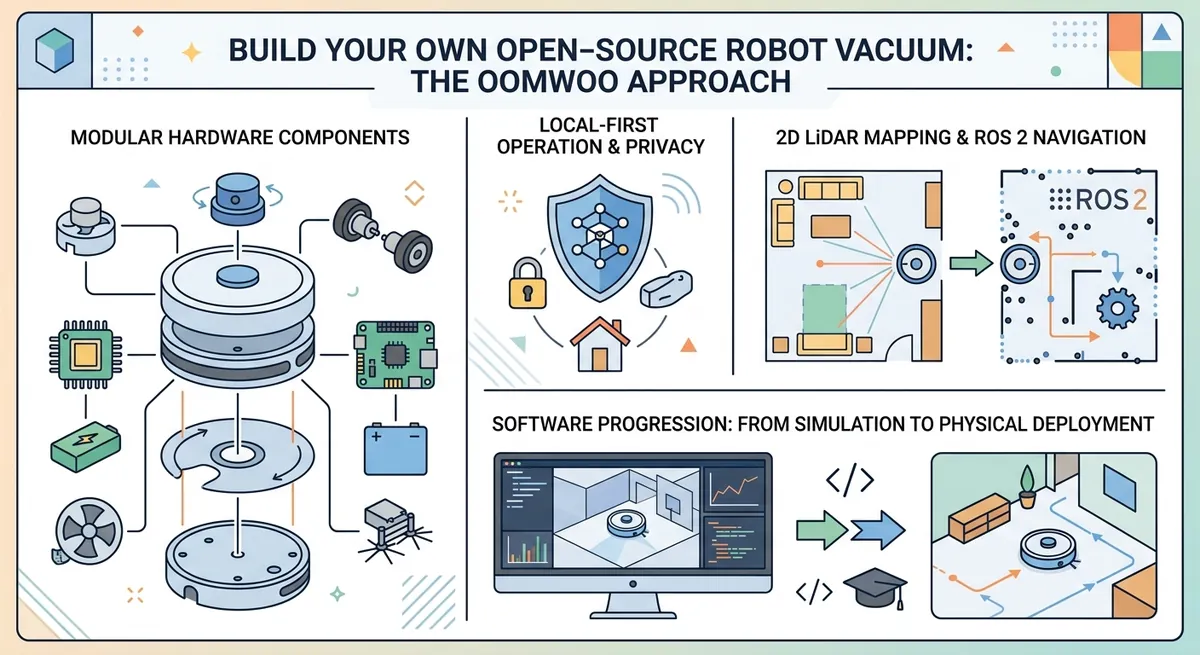
A robot vacuum that doesn’t disappear into the cloud
Picture this: you buy a robot vacuum, it cleans for a week, and then—almost mysteriously—it starts misbehaving. Maybe the map resets, maybe the app wants another permission, maybe it stops responding unless you’re online. That feeling is frustrating because the “brains” are treated like a black box.
The oomwoo project flips that story. It’s an open-source robot vacuum you build yourself—hardware, firmware, and software included—so you can understand what the robot is doing and modify it when you want. And because it’s designed as local-first, everyday cleaning doesn’t rely on a cloud connection.
A question many people search for is: how do you build a robot vacuum that can map rooms and navigate on its own without proprietary lock-in? That’s exactly the challenge oomwoo is tackling.
What “open-source robot vacuum” really means in practice
Open-source can sound like a slogan, so let’s ground it in concrete parts of the system.
A robot vacuum is more than a chassis and a fan. It needs:
- Hardware: motors, wheels, sensors, vacuum (suction/blower), and a control board.
- Firmware: low-level software that runs directly on embedded hardware (for example, an ESP32 microcontroller).
- Software: the higher-level logic that plans movement, builds maps, and integrates with user interfaces.
When oomwoo says open hardware, open firmware, open software, that means the design documents (like CAD files or PCB layouts), the embedded code (firmware), and the robotics software (running under a robotics framework) are meant to be accessible—not locked behind a vendor.
That matters because you can debug issues the way you’d debug any other engineering system: inspect logs, change configuration, and rebuild behavior from the source.
The core navigation stack: LiDAR, mapping, and ROS 2
To clean efficiently, a robot needs two key capabilities:
- Perception: understanding obstacles and walls.
- Navigation: deciding where to move next.
oomwoo targets 2D LiDAR mapping as the foundation. A LiDAR (Light Detection and Ranging) sensor shines laser pulses and measures distances to nearby surfaces. “2D LiDAR” means it produces a scan in a plane—like a top-down set of distance measurements rather than a full 3D point cloud.
For robotics software, oomwoo is built around ROS 2. ROS (Robot Operating System) is a framework for robot software; ROS 2 is the newer generation that supports modern tooling and multi-process systems. Within ROS 2, the project references Nav2.
Nav2 (Navigation 2) is a ROS 2 navigation stack that helps a robot move to goals while avoiding obstacles, based on a map and real-time sensor data.
Why this combination is popular: it turns a hard problem—autonomous movement—into a pipeline of components with defined responsibilities. That’s also why debugging becomes tractable.
What mapping and SLAM mean (and why it’s the tricky part)
As soon as you hear “robot vacuum maps your home,” it sounds like magic. The magic is really an engineering loop.
Mapping in robotics often relies on SLAM, which stands for Simultaneous Localization and Mapping. Localization means “where am I relative to the map?” Mapping means “what does the world look like?” SLAM tries to do both at the same time.
In plain terms: the robot drives, scans the room, and gradually figures out both its position and the layout.
oomwoo’s current milestone includes LiDAR with manual SLAM in simulation. That’s an important clue about the project’s realism. A “manual SLAM” phase usually means the system can build a map but not yet fully autonomously solve every ambiguity in real homes. That’s normal for early versions.
The good news is that these systems become clearer step by step:
- Start with simulation where you control the environment.
- Prove data flows: LiDAR → sensor frames → map representation.
- Then add autonomy: continuous localization, obstacle-aware motion, and coverage behavior.
The “local-first” promise: no cloud for cleaning
Many consumer robots phone home. oomwoo’s stated goal is different: no cloud required for everyday cleaning.
“Local-first” means the robot performs its critical tasks—navigation, obstacle avoidance, mapping, and control—using compute and network resources on the robot itself or within your local environment. That reduces points of failure:
- Your robot keeps working during internet outages.
- The behavior doesn’t change because a vendor changes an API.
- You can integrate locally with home automation.
A big example is Home Assistant integration. Home Assistant is a home automation platform that runs locally on your own hardware. Native integration typically means the robot can expose entities (like status, start/stop commands, or cleaning modes) without needing a proprietary mobile app.
How a build-it-yourself robot becomes “modules you can contribute to”
The momentum of a project like oomwoo doesn’t come only from code. It comes from how the project is organized.
oomwoo is set up so the community can work in parallel on modules—self-contained pieces of the robot and its software. Think of a module like a feature branch in real life: it has a clear scope, a defined interface, and a deliverable.
A few module directions mentioned include:
- ROS 2 URDF + Gazebo simulation: URDF (Unified Robot Description Format) is a file format describing the robot’s links and joints, used by ROS. Gazebo is a physics simulator. Together they let you test motion and sensing before touching real hardware.
- First clean: coverage cleaning—driving around systematically while building a map.
- Dust bin: the mechanical design for storage and airflow path testing.
- Vacuum fan / blower assembly: the part that creates suction, where mechanical tolerances strongly affect performance.
This modular approach is a quiet superpower. It lets beginners contribute where they’re most confident—like CAD for a dust bin or simulation work for the URDF—while more advanced contributors tackle navigation algorithms.
Why simulation (Gazebo) is where beginners should start
Early robot projects can feel overwhelming because every failure is intertwined: sensor wiring, power levels, frame transforms, motion control, and software configuration.
Simulation helps separate those variables. In Gazebo, you can validate assumptions without waiting for a PCB re-spin or a 3D-print iteration.
For example, a URDF + Gazebo model can reveal issues like:
- The robot “thinks” its sensor is in the wrong place.
- Joint axes are inverted.
- Collision geometry is too large or too small.
Those mistakes are common early on, and they’re exactly the kind that simulation makes obvious. In the oomwoo roadmap, simulation is part of the first “v0” effort for that reason.
The hardware reality: chassis, 3D printing, and sensor placement
A robot vacuum’s chassis isn’t just a container. It defines geometry, mounting points, airflow, and center of mass.
oomwoo’s reference design emphasizes 3D-printable, documented, hackable chassis. That matters for two reasons:
- It accelerates iteration. If the wheelbase is slightly wrong, you can adjust and reprint.
- It makes sensor placement more transparent. With a top-down and bottom-down reference, you can reason about where the LiDAR sits relative to the wheels and bumper.
Sensor placement impacts navigation accuracy. If the LiDAR is offset from the center of rotation, the robot’s map can slowly drift. Early designs often include careful mechanical documentation so software developers can calibrate with confidence.
A likely compute split: Raspberry Pi vs micro-ROS on ESP32
Robots often use multiple compute tiers:
- A higher-level computer runs navigation, mapping, and ROS 2 nodes.
- A microcontroller handles real-time I/O like motor control and sensor sampling.
oomwoo mentions architecture exploring Raspberry Pi 5 and/or ESP32 running micro-ROS. A Raspberry Pi is a credit-card-sized computer that can run Linux and ROS 2 workloads. An ESP32 is a low-power microcontroller typically used for real-time control.
micro-ROS is a ROS-compatible implementation designed for microcontrollers. It allows parts of the ROS ecosystem—like message passing and topics—to work on constrained devices.
This split is valuable because motor control and sensor timing benefit from deterministic embedded behavior, while mapping and navigation benefit from richer compute.
The roadmap’s note that the “final architecture is still being decided” is a healthy sign. Early robotics projects often change compute boundaries once the team sees real bottlenecks.
So what does “v0” look like, really?
OOMWOO’s current public milestone is positioned as early: a bare-bones, working build.
In practical terms, v0 includes:
- 3D-printed chassis: to get a physical platform.
- ROS 2 Gazebo simulation: to validate software interfaces.
- LiDAR with manual SLAM: to generate maps and understand motion constraints.
- ROS 2 on Raspberry Pi 5 and/or ESP32 with micro-ROS: to test where control logic lives.
This is how robotics progress often happens: first ensure the data pipeline and the movement loop exist. Only then do you push autonomy to the level that feels like “a real appliance.”
Where the project is headed: from map-building to appliance-grade behavior
The end goal isn’t just “it drives around.” A useful vacuum must:
- Run robustly across different room layouts.
- Avoid getting stuck on edges and furniture legs.
- Cover space thoroughly without wasting time.
The roadmap references deliverables such as a bill of materials (BOM), 3D-printable files, ROS 2 packages, firmware, and documentation including bringup and troubleshooting. That last part—troubleshooting docs—is often what determines whether a DIY robot feels approachable or frustrating.
Because when something breaks, open projects let you trace the failure from symptoms back to the code, the electrical design, or the mechanical assumptions.
Conclusion: owning the whole system changes the experience
Building a robot vacuum like oomwoo isn’t just about saving money or chasing a fun weekend project. It’s about shifting from a consumer appliance to a transparent engineering system.
With a local-first architecture, 2D LiDAR mapping, ROS 2 navigation components like Nav2, and modular development, oomwoo aims to make autonomous cleaning understandable and modifiable. The early v0 focus on simulation, manual SLAM, and a working baseline shows the team is tackling the hardest problems in the right order.
When robotics is open, the “mystery behavior” stops being mysterious—and the robot becomes something you can genuinely learn from, not just use.
Comments (0)
No comments yet. Be the first to respond!
Leave a Comment
Your comment will be visible after review.