If You’re a Button, You Have One Job: Don’t Block the User’s Intent
 by ahsan
July 05, 2026
6 min read
by ahsan
July 05, 2026
6 min read
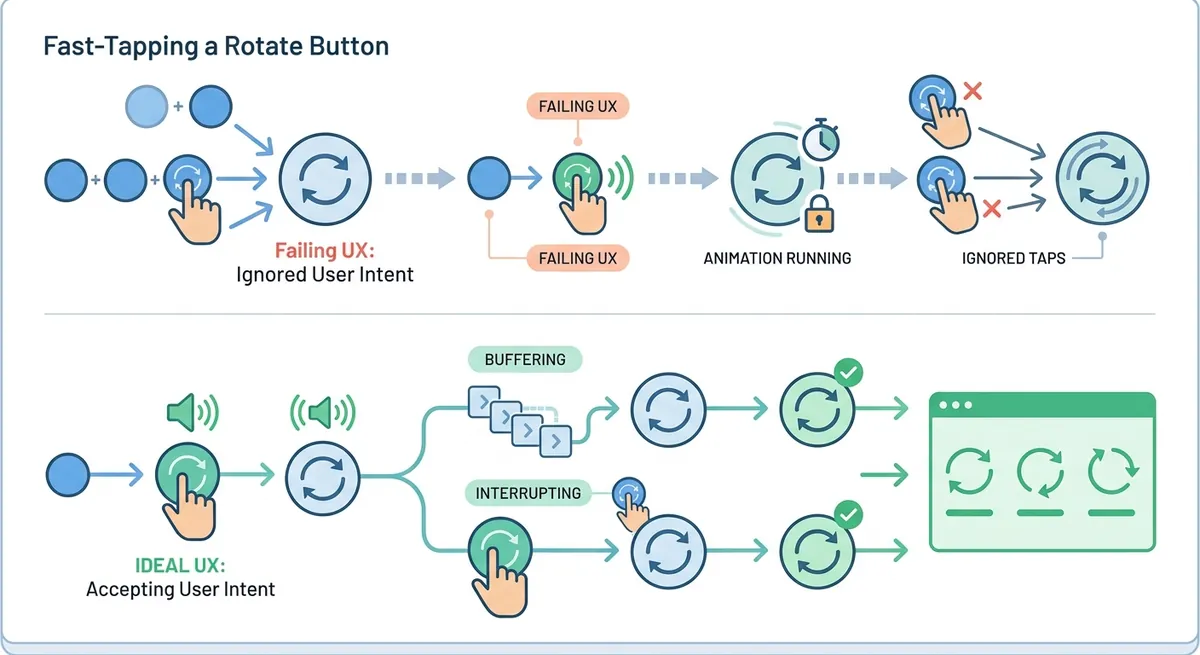
Imagine you’re on your phone trying to rotate a stack of photos—maybe you’re digitizing receipts, scanning notes from a desk, or simply trying to fix a batch of “portrait but actually landscape” shots. The UI gives you a rotate button: tap once to rotate, tap again to rotate again. Great.
Then you test it. You tap eight times quickly—fast enough that a human would expect “rotate eight quarter-turns and end up back where we started.” On one phone, the result matches your expectation. On another, the UI starts feeling hostile, because the interface treats rapid taps like they never happened.
This is the heart of the lesson: a button’s job is not to manage animation timing. A button’s job is to respect user intent—even when users act faster than the animation can complete.
The experiment: rapid taps and the expectation of a “no op”
Let’s translate what happened into plain engineering language.
A 90-degree rotation means the image turns a quarter-turn (think: landscape to portrait and back, like rotating a page). Tapping eight times at 90 degrees each is a full set of rotations:
- 4 taps = 360 degrees (one full revolution)
- 8 taps = 720 degrees (two full revolutions)
- After two full revolutions, the image should be back where it started
In engineering terms, a no op (short for “no operation”) means the system ends up with the same state it started with, even though actions occurred.
On iPhone, the rapid taps behave as if the app “buffers” them.
On Nothing Phone / Android (in the behavior described), the button provides user feedback through haptics (a vibration) and sound, but then it ignores additional taps while an animation is still running.
That mismatch—between what the user did and what the UI accepted—is what makes the interaction feel broken.
Buffering taps vs. ignoring taps
To understand why this matters, we need two ideas: animation and input buffering.
An animation is a time-based visual transition—here, the image turning smoothly rather than snapping instantly. A UI can animate for, say, 250–600 milliseconds. During that window, the app has to decide what to do with new user input.
Input buffering means the app records user actions that arrive while busy, then executes them later in order. Instead of dropping taps, it queues them.
In the iPhone behavior, the UI appears to:
- Receive tap #1 and start rotating
- Receive taps #2–#8 while the first rotation animation is still in progress
- Apply the pending taps immediately once the current animation is done
In the Nothing Phone behavior, the UI appears to:
- Receive tap #1 and start rotating
- When tap #2 arrives, play haptics/sound (confirming to the user that input happened)
- Ignore the tap if a rotation is already animating
The second behavior is particularly tricky because it gives false confirmation: the user feels a tap response but doesn’t get the expected change in outcome.
Why does the “button job” matter?
The phrase “situational disability” is useful here. Situational disability means a person isn’t always disabled all the time, but certain environments or interaction patterns can temporarily make them effectively disabled.
Rapid UI animations and blocked interactions can create that situation for many people—even when nobody is “disabled” in the permanent sense.
Consider who might struggle with a UI that forces waiting:
- Someone with motor timing differences who taps faster or slower than the animation expects
- Someone under glare, in motion, or multitasking who can’t perfectly time taps
- Someone using assistive technologies that introduce delays or replays of input
- Someone who simply wants efficiency because they’re doing a repetitive task (like rotating many photos)
Even for power users, blocked interactions waste attention. If the UI tells your brain “you must wait for the animation to finish,” then every tap becomes a small negotiation instead of a direct command.
So the real question becomes: should a UI block user input for the sake of its visual smoothness?
When the UI ignores taps, the answer shifts from “smooth animations are nice” to “smooth animations are prioritizing the wrong thing.”
The practical scenario: rotating dozens of photos
Phone cameras often detect orientation automatically, but the heuristic can fail—especially when the camera points down at a surface (like a table of documents). In that common workflow, you might end up rotating dozens of images one by one.
This is where interaction design stops being theoretical.
Humans naturally form expectations about cause and effect. If each tap means “rotate by 90 degrees,” then tapping three times should mean “rotate by 270 degrees,” regardless of how long the animation takes to draw it.
People also develop pacing strategies: they tap at a comfortable speed, without thinking about milliseconds. A UI that requires perfect synchronization with the animation forces the user into a role they didn’t ask for: timing engineer.
Designing for the average pace—and the occasional rapid pace—is the difference between “pleasant” and “annoying.”
A better rule: never force the user to wait
The most important principle here is a straightforward design maxim:
Never force the user to wait for the animation to finish.
That doesn’t mean you can’t animate. It means the UI must remain responsive to intent.
There are multiple engineering strategies to achieve that. The post discussed two broad approaches:
Option 1: Buffer and replay taps
This approach keeps the UI honest. Every tap is accepted and recorded, then applied in order.
Conceptually:
User taps -> record input -> start animation -> keep recording -> apply queued rotations after animation
This strategy aligns with the idea that the button is a command interface, not a timing interface.
Option 2: Interrupt or accelerate the current animation
Instead of queuing everything, you can change the animation mid-stream when new input arrives.
For example, if the user taps again while rotating, the UI might:
- Stop the current animation at the next stable frame
- Recalculate the target orientation
- Start a new animation toward the new target
Conceptually:
Animation in progress -> new tap arrives -> adjust target -> restart animation without dropping intent
This preserves responsiveness and often feels more “direct,” because the UI responds to new intent immediately.
What to avoid: acknowledging input, then discarding it
The most harmful pattern is the hybrid one described: play haptics/sound (which implies acceptance), then ignore the tap because the animation is busy.
That produces a subtle mismatch:
- The input channel says “your action was received”
- The state channel says “no it wasn’t, sorry”
When those disagree, users lose trust. In repeated tasks (rotating many photos), mistrust becomes friction.
Buttons should model user intent, not animation constraints
Animations exist to communicate change. They are part of the user’s understanding of system state.
But animation time is an implementation detail. A button’s role is to convert a user’s action into a predictable system state change.
So the UI should choose one of two paths:
- Accept the input and schedule the resulting state changes (buffering)
- Accept the input and re-target the current transition (interrupt/accelerate)
Either way, the system must avoid the third path: accept feedback but ignore the meaning.
This “button job” framing is a helpful mental model because it applies beyond photo rotation.
Whenever a button triggers an animated effect—reordering lists, playing a preview, stepping through frames, toggling views—the same question emerges: is the button a command, or a suggestion that depends on timing?
Conclusion: smoothness without blocking
Fast taps revealing slow design is a story as old as interactive UI itself, but it’s also a story we can improve. When a button’s animation blocks user input, it turns a simple command into a coordination task.
A responsive interface buffers intent or interrupts transitions so the user never has to wait for visuals to finish. That single rule—never force the user to wait for the animation to finish—keeps interactions predictable, efficient, and more accessible in the real world where people don’t pause to match your frame rate.
Comments (0)
No comments yet. Be the first to respond!
Leave a Comment
Your comment will be visible after review.