Independence Is a System, Not a Solo Performance
 by ahsan
October 05, 2026
5 min read
by ahsan
October 05, 2026
5 min read
Independence is a systems property
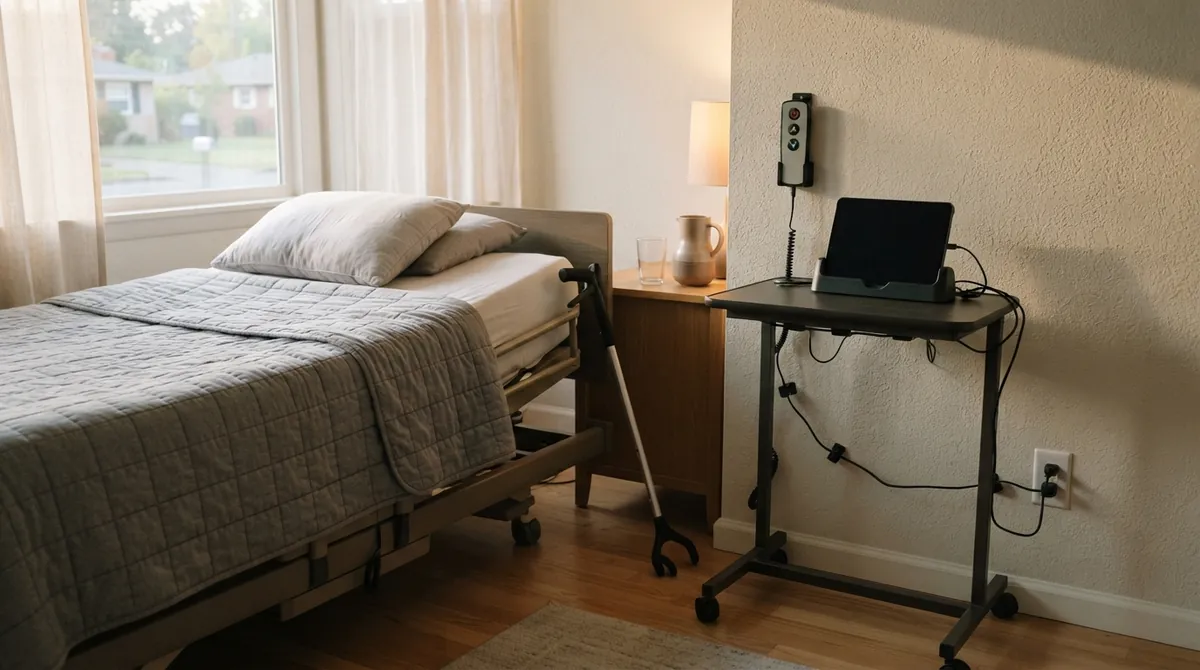
Picture a bedside workspace arranged like a small cockpit: an adjustable bed, a tablet dock, a remote within reach, a rolling cart, and charging cables routed so they do not become hazards. A grabber replaces a long walk across the room. Grocery delivery replaces a trip through a store. To someone looking only at the visible assistance, this can seem like dependence. From an engineering perspective, it is a system designed around a person’s actual inputs, limits, and goals.
A useful search question is: what does independence mean when assistive technology is part of the plan? The answer starts by separating independence from autonomy. Independence is often treated as completing a task without help. Autonomy means directing your own life: choosing the destination, setting priorities, refusing an option, and deciding when a task is finished. Interdependence means people and tools contribute to the work while the person keeps meaningful control.
This is not a niche design concern. The Centers for Disease Control and Prevention reports that more than one in four U.S. adults have some type of disability. The World Health Organization projects that by 2030, one in six people worldwide will be 60 or older, with the number of people aged 60 and above reaching 2.1 billion by 2050. The future will contain more varied bodies, more changing abilities, and more situations where a person’s success depends on the environment around them. (cdc.gov)
The user is not the whole system
Software teams already use a similar idea: an application is not only its source code. It depends on the operating system, network, permissions, hardware, and the person operating it. Human ability works in a comparable way. A staircase can remove mobility from an otherwise mobile person. A tiny touch target can turn a banking app into a task that requires another pair of hands. A captioned video, a flexible appointment system, or a delivery window can restore options that the default design took away.
This changes what accessibility means. Accessibility is not a decorative layer added after the main product is complete. It is the set of choices that lets more people perceive information, operate controls, understand outcomes, and recover from errors. Assistive technology—hardware or software that helps a person interact with the world—works best when the surrounding system exposes clear structure.
Build a stack of support
Start with the physical layer
Before a screen appears, there is reach, grip, posture, lighting, noise, battery life, and placement. A device mounted six inches too far away may be unusable. A charger with a stiff connector may turn a helpful tablet into a dead rectangle. Good design treats these details as interface decisions, not housekeeping.
The same principle applies to services. A telehealth appointment can be technically available yet practically inaccessible if the login expires during a handoff, the camera cannot be repositioned, or the platform offers no way to include a support person without surrendering the whole account.
Give the browser something meaningful to say
A browser builds an accessibility tree, a structured representation of interface objects that it can expose to screen readers—software that converts interface text into speech or braille—and other assistive technologies. The clearer the underlying markup, the more reliably a user can navigate, identify, and operate the page. (w3.org)
Compare these two controls:
<!-- Looks like a button, but has no native button behavior -->
<div class='save' onclick='saveDraft'>Save draft</div>

<!-- A native control -->
<button type='button' id='save-draft'>Save draft</button>
The div may look correct on screen, yet a developer must add keyboard activation, focus behavior, an accessible name (a program-readable label), and state updates by hand. The native button already communicates its purpose to the browser and supplies expected interaction patterns. In Cascading Style Sheets (CSS), keep its focus—the control currently ready to receive input—visible too:
button:focus-visible {
 outline: 3px solid #1f6feb;
 outline-offset: 3px;
}
Accessible Rich Internet Applications (ARIA) can describe custom widgets when native HTML cannot express the interaction, but ARIA does not create the interaction by itself. A custom control still needs a keyboard model, focus management, and accurate state changes. That is why semantic HTML—using an element whose meaning matches its job—is often the most dependable starting point. (w3.org)
The Web Content Accessibility Guidelines (WCAG) 2.2, a W3C standard for accessible web content, makes this broader than color contrast. Its newer criteria address issues such as focus being hidden, dragging-only interactions, target size, repeated form entry, and accessible authentication. WCAG 2.2 became a W3C Recommendation on December 12, 2024, and was approved as the ISO/IEC 40500:2025 international standard on October 21, 2025. Those details point toward a useful mindset: small frictions are not small when they block a task.
Design the handoff, not only the task
Real life crosses boundaries. A person may choose an item, ask a family member to place it on a high shelf, approve a purchase, and track a delivery through three different systems. The technical pattern that helps here is delegated access: permission for another person to perform a limited action without taking ownership of the entire account.
A small data format such as JSON, or JavaScript Object Notation, might represent that arrangement like this:
{
 "helper": "trusted-family-member",
 "can": ["add_items", "view_delivery_status"],
 "cannot": ["change_payment_method"],
 "checkout": "owner_approval_required",
 "expires": "2026-10-12"
}
This is not a product standard. It is a design sketch. The important properties are scope, expiry, visibility, and revocation. An audit trail—a record of who did what and when—lets the account owner spot mistakes without forcing every helper to share a password.
Expect failure
Support systems fail. Batteries empty. Internet connections drop. A caregiver becomes unavailable. An app redesign moves the control that used to be within reach. Graceful degradation means the essential task remains possible when one layer stops working: a physical control remains available, instructions can be downloaded, a phone channel exists, or the user can pause without losing their work.
That kind of resilience is a form of independence. It does not pretend support is unnecessary; it prevents one missing support from collapsing the whole day.
Measure agency, not the absence of help
A useful accessibility review asks different questions from a traditional usability check:
- Can the person choose the input method that fits their body and energy today?
- Does every important action have a clear result, including a result a screen reader can announce?
- Can a trusted helper assist without taking over unrelated decisions?
- Can the person pause, undo, or recover after an error?
- Does the system keep working when a device, connection, or person is unavailable?
The strongest measure is not whether a user performed every step alone. It is whether the system preserved choice, privacy, safety, and participation while support moved through it.
The future of independence will not be built by hiding how much everyone relies on infrastructure, software, labor, and care. It will be built by making those connections visible and controllable. A well-designed room, website, or service does not remove interdependence; it turns interdependence into agency.
Comments (0)
No comments yet. Be the first to respond!
Leave a Comment
Your comment will be visible after review.