OpenPrinter: a repairable ink-refill printer built on open hardware (and why it matters)
 by ahsan
July 06, 2026
8 min read
by ahsan
July 06, 2026
8 min read
A familiar frustration: printers that “break” long before the paper runs out
Picture this: you’re ready to print a document for work, and your printer refuses—because one color cartridge is empty, even though you only need black. That moment feels personal, but it’s also a design pattern: many printers assume consumables are disposable and tightly coupled to the print head. When something dries out or a cartridge reports “empty,” the whole printing workflow can stall.
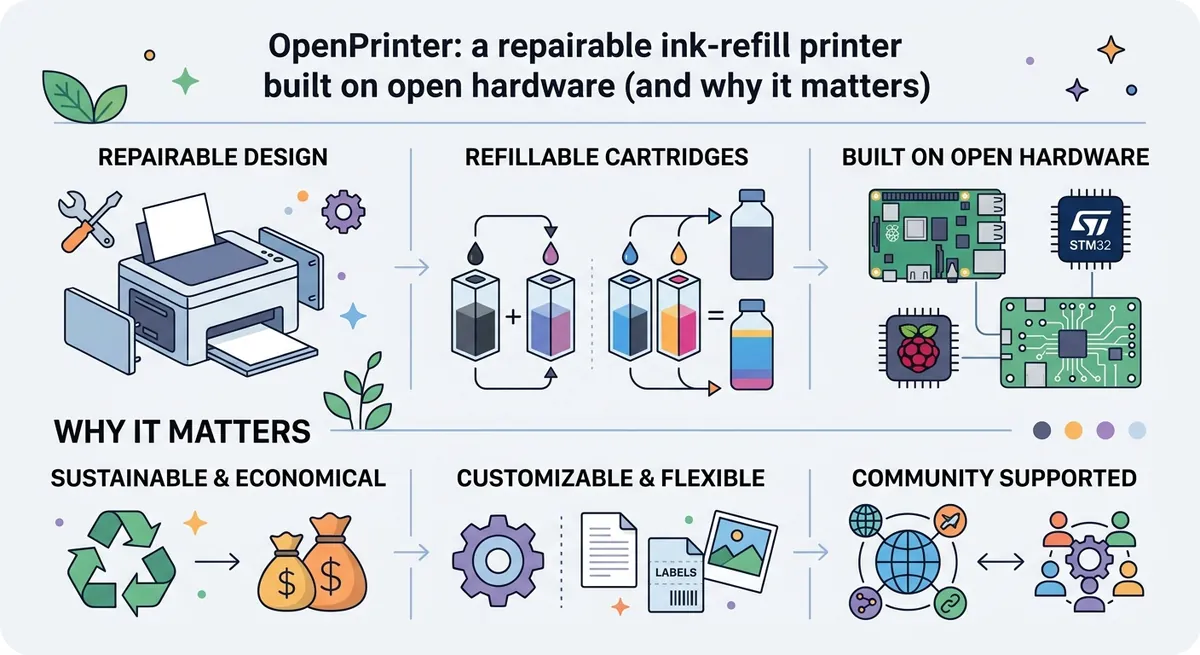
OpenPrinter’s pitch is different. It’s a compact printer/plotter designed to be repairable, uses a refillable ink system, and—crucially—lets you use black and color cartridges independently. That combination isn’t just about convenience; it changes the economics, maintenance, and even the “lifespan” of your printer.
And yes, readers searching for “repairable printer” and “refillable ink system” want to know the real technical story behind those claims. This post walks through what those features mean in practice.
The core idea: decouple printing from “walled garden” cartridges
Most mainstream inkjet ecosystems treat cartridges as replaceable units. Once a cartridge is empty (or detected as empty), the printer stops depending on your actual ink level and starts depending on its own internal rules.
OpenPrinter aims to break that dependency in two ways:
- Independent cartridge usage. Black and color cartridges can be used separately, so an empty color doesn’t prevent black-only printing.
- Refillable ink cartridges via an Inkit. Instead of buying a new cartridge every time, you refill ink bottles into rechargeable cartridges.
This matters because ink cartridges are often the #1 consumable cost. It also matters for waste: replacing whole cartridges more frequently produces more electronic waste than refilling ink does.
What “independent cartridges” prevents (and what it enables)
On many printers, the firmware (the software inside the printer) couples nozzle health and cartridge states. If the printer detects a missing/empty cartridge, it can refuse to fire the remaining nozzles.
With OpenPrinter’s approach, the system can route print jobs through only the cartridge you actually need. In plain terms: if the job is black text, it can use the black cartridge without being blocked by the color cartridge’s ink status.
That’s exactly the kind of failure mode people hate—because it turns a small consumable issue into a full workflow shutdown.
Ink refilling as a system: cartridge reuse plus a refill workflow
Refillable ink systems sound straightforward—until you think about what has to be consistent for the printer to stay reliable.
A refill workflow has to manage:
- Ink supply quality: ink has to flow predictably to the cartridge.
- Cartridge sensing: the printer needs a usable representation of ink state and/or safe operation modes.
- Nozzle reliability: inkjet print heads can clog if ink dries or if the printer behaves inconsistently.
OpenPrinter includes “rechargeable ink cartridges (with the Inkit)” and uses ink bottles for Black, Magenta, Cyan, and Yellow. That gives you a refill unit and a source of inks that match the cartridge color channels.
What those color channels mean (black vs CMYK)
Inkjet printers typically use a small set of inks to create all colors. The “color” side in these systems usually relies on CMYK, where:
- Cyan and Magenta and Yellow mix to form a wide range of colors.
- K (Black) is used both for deeper blacks and for improving contrast.
OpenPrinter’s cartridge design supports:
- Single cartridge mode: black only or color only.
- Combined mode: black and color together.
From a user perspective, this is why black text stays crisp even when you don’t need full color output.
Printing formats: from single sheets to rolls and custom banners
Another practical headache with many desktop printers is paper inflexibility. You buy a printer, then you live in one paper size.
OpenPrinter is designed to support both European sheet formats and roll paper, and it also targets creative use cases such as banners and strips.
Sheets: A4 and A3
In the European catalog, A4 is the common document page (roughly 210×297 mm), while A3 is larger (twice the area of A4). Supporting both helps for school prints, posters, and diagrams.
Rolls: choosing width and length
OpenPrinter’s roll support is defined by a roll width and a roll length (for example, a 29.7 cm wide roll with either 18 m or 37.5 m length, depending on availability). Rolls are the enabling technology behind:
- long banners,
- label strips,
- and “print, cut, repeat” workflows.
The “cutting” part: why an integrated cutter changes the experience
An integrated cutter is a hardware component inside the printer that cuts the printed output automatically. Instead of using a manual cutting step, you get a repeatable finish.
This is more than convenience. When people print banners, decals, or strip labels, they care about consistent dimensions. A cutter turns “continuous roll output” into discrete pieces.
Even without getting into mechanical engineering details, the key idea is: roll printing + cutting supports a workflow closer to a small shop printer/plotter rather than a “home inkjet that happens to take rolls.”
Open hardware and repairability: standard components and modular control
The most technical claim in the description is also the most important one for longevity: OpenPrinter is built from standard and open source components, making it easier to assemble, maintain, and repair.
That design philosophy targets a harsh reality: many printers become “unrepairable” not because parts don’t exist, but because the machine is locked behind proprietary modules, undocumented electronics, or firmware you can’t reason about.
A quick tour of the electronics stack
The technical specifications mention two key controller elements:
- Main board: Raspberry Pi Zero W
- The Raspberry Pi is a small single-board computer (a compact computer with I/O pins) that runs Linux.
- “Zero W” indicates a specific low-power model with built-in wireless networking.
- Cartridge board: STM32 microcontroller
- An STM32 is a microcontroller, meaning it’s a dedicated chip for real-time control tasks (like actuating pumps/valves or reading cartridge status) rather than running full desktop software.
The division of responsibilities is a common pattern:
- The Raspberry Pi handles printing workflows, networking, and user-facing orchestration.
- The STM32 handles time-sensitive cartridge-level operations.
Why an open print server matters: CUPS
OpenPrinter uses an open source print server called CUPS. CUPS (Common UNIX Printing System) is the standard printing layer on many Linux and Unix-like systems, and it can also provide a consistent interface for other operating systems.
With a CUPS-based architecture, OpenPrinter can accept print jobs in a more universal way. The description emphasizes “driver-free” behavior, which usually means: the host OS can send common print data to a network service, reducing the custom driver burden.
This is the sort of detail that influences usability across Windows, macOS, Linux, and mobile devices.
Connectivity and workflow: USB-C, USB-A, Wi‑Fi, Bluetooth
Printers often force you into one path: “Send print jobs from a computer through a specific app.” OpenPrinter instead supports multiple common routes:
- USB Type-C for computer connectivity.
- USB Type-A for printing from a flash drive.
- Wi‑Fi 802.11ac for network printing (also compatible with features like AirPrint).
- Bluetooth 4.1 for short-range connectivity.
From a systems perspective, this reduces the number of “moving parts” in your day-to-day printing. If one path becomes inconvenient, another is available.
Ink cost and waste: where the savings actually come from
“Economical” and “eco-friendly” can be marketing phrases, so it helps to translate them into mechanisms.
OpenPrinter’s savings come from at least two places:
- Refillable cartridges reduce the frequency of buying cartridges. You replace ink bottles and keep the cartridge hardware longer.
- Independent cartridge usage prevents wasted waste. When black is needed, you don’t need to discard or replace color cartridges just because a color is empty.
Waste reduction follows naturally: fewer discarded cartridges means less plastic and less electronics junk accumulating in landfills.
A self-assembly option and flexible installation: desk or wall
Repairability often depends on physical access. If a device is sealed, maintenance becomes difficult. OpenPrinter’s description includes a self-assembly kit option and also supports mounting on a desk or on a wall (with a wall kit).
Wall mounting can be more than aesthetics—it can make printers more accessible for shared workspaces like studios or workshops, where print media and trimming might happen frequently.
Meanwhile, compact dimensions (roughly 497×233×111 mm) matter because they influence whether the printer can live in a permanent location rather than being stored and retrieved.
Resolution and speed: what 600 dpi vs 1200 dpi suggests
The technical specs list:
- 600 dpi for black and white
- 1200 dpi for color
DPI (dots per inch) is a measure of how many ink dots are placed within a one-inch segment of the print. Higher DPI often correlates with finer detail, smoother gradients, and more precise color reproduction.
Speed is noted as “to be defined,” which is realistic for early product stages. In real life, speed depends on the complexity of the print job and on how the printer balances nozzle firing patterns with ink drying behavior.
Putting it all together: why OpenPrinter’s design feels different
OpenPrinter isn’t only a printer; it’s a small ecosystem: refillable consumables, independent cartridge operation, roll paper support with integrated cutting, and an open-source print stack powered by Raspberry Pi + microcontroller control.
That combination targets three pain points many people feel but rarely see solved together:
- Operational reliability (no black-blocked-by-yellow behavior).
- Lower lifecycle cost (refill instead of replace).
- Longevity and serviceability (modular, open components make repair more feasible).
And in the bigger picture, this approach pushes back against the throwaway cycle that often defines consumer printers.
Conclusion: repairability is a design decision, not a warranty statement
A printer’s true quality shows up after months of use: when cartridges are empty, when paper formats change, when the device needs cleaning, and when a component eventually fails.
OpenPrinter’s technical choices—refillable cartridge design, independent black/color operation, roll printing with an integrated cutter, and open hardware/software building blocks—create a machine that aims to stay useful instead of becoming obsolete. For anyone tired of being interrupted by consumables, it’s a refreshingly different philosophy: build a printer that lasts, not one that merely prints.
Comments (0)
No comments yet. Be the first to respond!
Leave a Comment
Your comment will be visible after review.