Organic Maps: How Offline Navigation Works (and Why It Feels Magical)
 by ahsan
July 05, 2026
7 min read
by ahsan
July 05, 2026
7 min read
Picture this: you’re two hours into a hike, the trail head is behind you, and your phone bar drops from “no worries” to “maybe not.” The map app still spins, searching for something that isn’t there. Now imagine the opposite—your phone keeps navigating smoothly even with zero mobile signal.
That’s the promise behind Organic Maps: a privacy-focused offline maps and GPS navigation app that can search and guide you without an internet connection. In this post, we’ll unpack what “offline navigation” actually means under the hood, why it’s practical for hiking and cycling, and what kinds of features you can expect when the network isn’t part of the equation.
What “offline maps” really means
Most mapping apps rely on the internet for key pieces: fetching map tiles, loading place details, and sometimes calculating routes with online services. Offline maps flip that dependency. When you download a region ahead of time, the app stores the needed map data locally on your device.
To ground the idea, think of your phone like a small backpack. With offline maps, you pack the map pages before leaving. Without offline maps, you’re counting on the world to hand you pages as you walk—until it can’t.
Organic Maps uses OpenStreetMap data (often shortened to OSM). OpenStreetMap is a community-built, open geodata project where volunteers map roads, paths, trails, and points of interest. Because OSM data is open, offline map building becomes realistic for many regions.
The practical result is the thing you’ll feel in the moment: you can browse, search, and navigate even when your SIM card can’t help.
The core ingredients: map tiles, searchable places, and routing
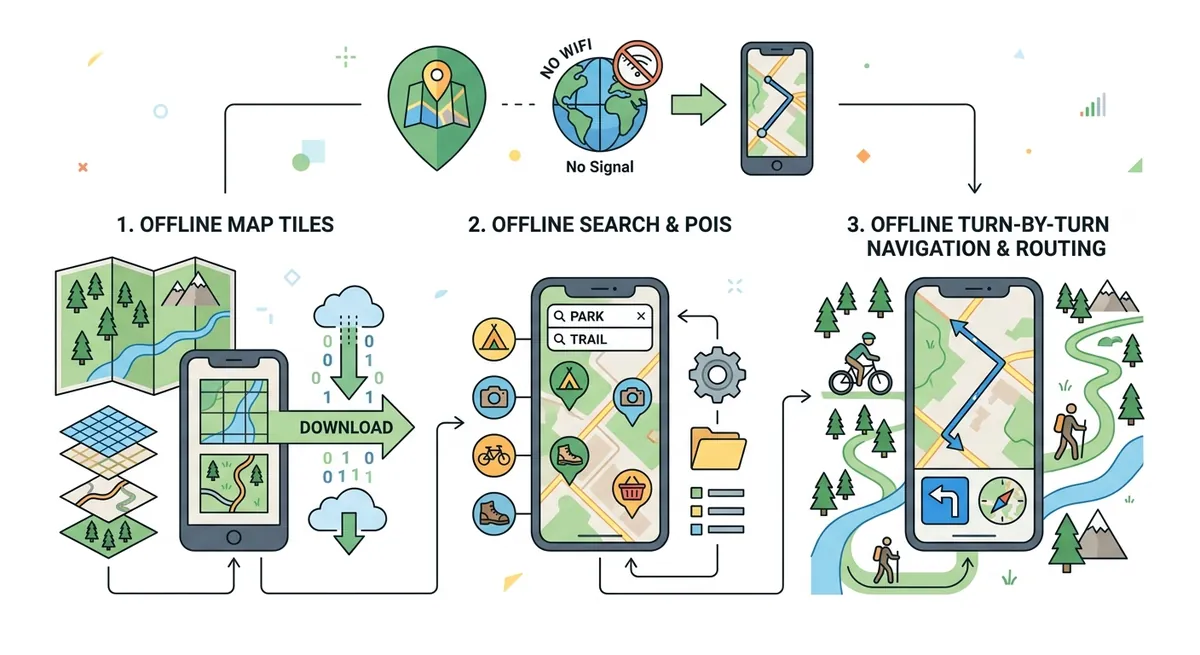
Offline navigation isn’t a single magic file. It’s a set of components that work together.
1) Map tiles (the images or chunks of the map)
A map is too large to store as one giant picture, so it’s split into tiles—small rectangular chunks at different zoom levels. When you pan around, the app loads the relevant tiles from storage.
This is why downloading “countries and regions” is useful: the app can store the exact chunks you might need for your trip rather than the entire world.
2) Place data (the “what is here?” layer)
A map that you can only view is limited. Search requires knowledge of things like trails, viewpoints, roads, stations, and other points of interest (POIs).
Offline search means those POIs (and often their names and categories) must also be available on-device. That’s how an app can answer the question people search for—“Where am I, and what’s nearby?”—even in airplane mode.
3) Routing (the “how do I get there?” layer)
Routing is route planning: computing a path from your current location to a destination. Many apps delegate routing to cloud servers. Offline routing requires the app to have a graph representation of the road/trail network already stored.
That graph is essentially a network of edges (road segments, paths, trail segments) and nodes (junctions, intersections). When you request navigation, the app runs a route-finding algorithm on that stored network.
This is the tricky part that often surprises beginners: offline routing isn’t just “maps cached.” It’s also the network structure that enables pathfinding.
Why hiking and cycling benefit most
Hiking and cycling are the perfect match for offline maps because connectivity often fails exactly when you need guidance.
There’s also a practical nuance: these activities care about different kinds of paths than driving does. A “road” on a city map may be irrelevant when you want a walking path, a cycle route, or a trail that might not look like a standard street.
Organic Maps is built around these use cases. Features like hiking trails and cycling routes matter because the route network you store offline must reflect the real-world path types people use.
Elevation: contour lines and why they change your route
One of the most helpful aspects for outdoor navigation is elevation awareness. Contour lines are lines that connect points of equal height on a map; they let you “see” hills and slopes even when you aren’t looking at them.
When an app displays elevation profiles, you can visualize how steep a climb is. This matters for biking and hiking because route comfort is often governed by gradients more than distance.
A route that looks short on a flat map can be exhausting when you notice a long ridge climb. Offline maps that include elevation data give you that context without sending your location to the network.
Turn-by-turn navigation: what your phone is doing moment to moment
Turn-by-turn navigation means the app tells you step events—like “Turn left in 200 meters”—as you move.
Under the hood, it combines:
- Your position from GPS (Global Positioning System) and device sensors.
- A route computed from the offline network.
- Progress tracking, which determines which step you’re currently approaching.
- Voice guidance, which turns instructions into audible directions.
Even without internet, the app can keep matching your movement to the route because the route geometry and step logic are already stored locally.
This is also where battery savings come from. When you aren’t constantly requesting map data or route results from the cloud, you can often spend less time on network hardware.
Privacy: “offline” is only half the story
Offline maps reduce network traffic, but privacy also depends on what an app does with the data it has.
Organic Maps positions itself as privacy-focused—no ads, no trackers, and minimal data exchange. The key idea is that offline capability lets the app deliver value without repeatedly phoning home.
Still, privacy is more than “no internet.” It’s about whether an app sends telemetry, uses advertising identifiers, or collects location history. A well-designed offline app limits both the need and the opportunity for that kind of behavior.
Import and export: taking your trips with you
Another technical feature worth understanding is data interchange: KML/KMZ, GPX, and GeoJSON.
These are common geodata formats:
- GPX (GPS Exchange Format) stores tracks and waypoints—great for hiking recordings and route sharing.
- KML/KMZ (Keyhole Markup Language / zipped KML) is widely used with mapping tools.
- GeoJSON represents geographic features in a JSON structure that many apps and libraries can read.
Import/export matters because offline navigation doesn’t end when you finish your walk. It supports workflows like saving bookmarks, planning before the trip, and exchanging routes with other tools.
Dark mode and readability in harsh conditions
Dark Mode (a theme that uses light text on dark backgrounds) sounds cosmetic until you’ve used a phone at dusk or in a shaded forest. Bright screens can ruin your night vision. Dark mode helps keep the display comfortable while still letting you read roads and trail markers.
In navigation, readability isn’t a luxury—contrast and visual clarity affect how quickly you can interpret turns and labels.
How to think about “download size” and offline coverage
Offline maps succeed when the downloaded region matches your route. Downloading too little can leave you without tiles or POIs mid-trip; downloading too much can eat storage.
A good mental model is capacity planning:
- Estimate where you’ll be (area coverage).
- Download that area at the right level of detail.
- Keep enough free storage so map updates or additional regions don’t fail.
This is especially relevant when traveling for days. You want reliability on day two, not just day one.
What makes Organic Maps feel different in practice
Once you’ve used an online-only map and an offline-first map back-to-back, the difference becomes emotional, not just technical. Offline navigation feels like stability: the app doesn’t lose its place when the signal disappears.
Organic Maps combines that stability with outdoor-oriented features—cycling routes, hiking trails, contour lines, and elevation visualization—so it’s not merely a “driving replacement.”
And because it’s tied to open geodata, it’s possible to build a usable offline experience without proprietary road data.
Conclusion: offline navigation is a full local system
Offline maps and GPS navigation aren’t magic downloads—they’re a carefully packaged local system: map tiles for viewing, POI data for search, and a route network for turn-by-turn guidance. Organic Maps is built around that idea, bringing offline search and navigation to hiking, cycling, and driving scenarios where internet access is unreliable.
Once those pieces are on-device, your phone stops behaving like it needs permission from the network. It becomes a dependable field companion—exactly when you need it most.
Comments (0)
No comments yet. Be the first to respond!
Leave a Comment
Your comment will be visible after review.