The Interim Computer Museum: Where Old Computers Still Answer Back
 by ahsan
September 13, 2026
5 min read
by ahsan
September 13, 2026
5 min read
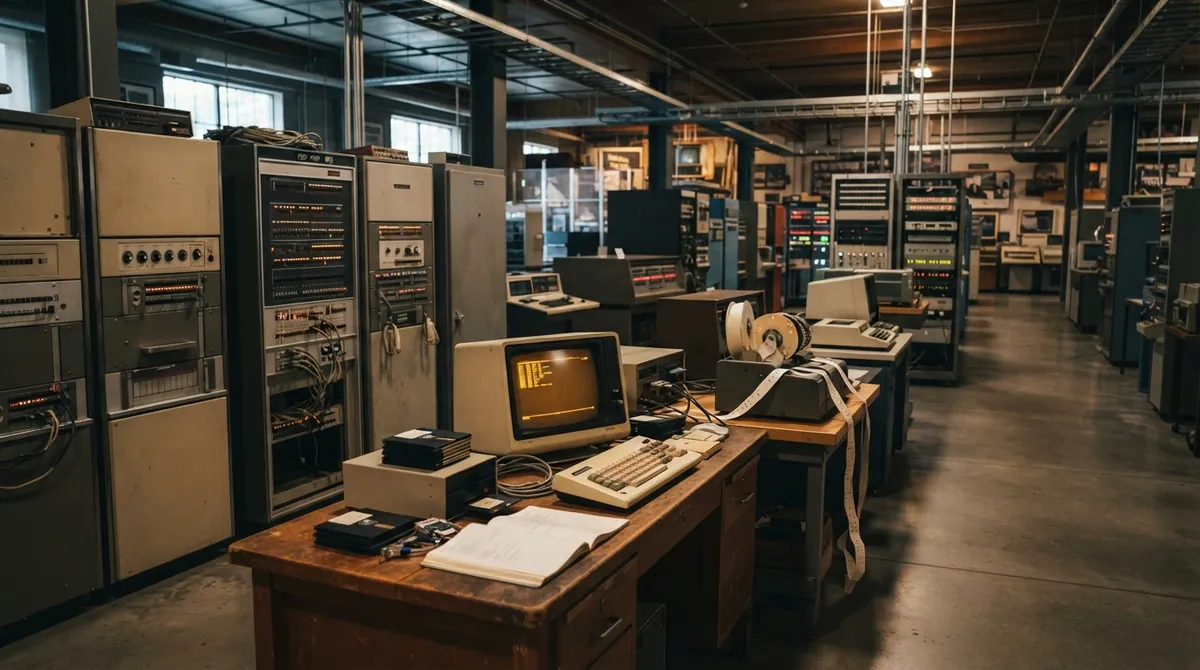
At most computer museums, a machine from 1975 is asked to sit quietly behind a barrier. You can admire the metal cabinet, the switches, perhaps a green display, and then move on. The Interim Computer Museum (ICM) in Tukwila, Washington, takes a more restless approach: it preserves computers as things people can use.
What does it mean to preserve a computer that is older than the network connecting to it? For ICM, the answer includes repairing hardware, recovering software, rebuilding interfaces, and keeping historical systems available to visitors both inside and outside the museum. In September 2026, the museum is in Phase IV of its expansion, adding 2,110 square feet to its large-systems gallery around KICKI, a 1972 Digital Equipment Corporation PDP-10, while making room for more microcomputers and workshops.
A museum preserves more than the box
Hardware means the physical parts of a computer: circuit boards, power supplies, drives, keyboards, and cabinets. Software means the instructions that make those parts useful. Between them sits the operating system, the foundational software that manages memory, storage, programs, and communication with the machine.
Remove the operating system and you lose much of the computer’s character. A PDP-8 is not only a metal chassis; it is also the boot sequence, the command language, the paper-tape routines, the timing of its response, and the programs that taught people how to work with it. ICM’s mission treats the object and the experience as related pieces of the same history.
That is where the museum’s partnership with SDF Public Access UNIX System matters. UNIX is a family of multiuser operating systems, meaning systems designed for many people to use one computer, often through separate terminals. SDF grew around that shared, networked style of computing, so it provides a natural home for ICM’s remote systems as well as its physical exhibits.
How to enter an old computer from a new one
ICM’s interactive online recollections extend the museum beyond its rooms. A visitor can use SSH, or Secure Shell, a protocol for opening a protected remote command-line session, to reach the SDF vintage-systems menu:
A command line is an interface where you type instructions instead of clicking icons. The first few minutes can feel unfamiliar, especially if your daily computer experience begins with a desktop or phone. Then the prompt starts to make sense. You choose a system, read its sign-on message, and learn what the machine expects.
The current menu includes environments such as Multics on a Honeywell 6180, the TOPS-20 operating system on XKL TOAD-2 and SC40 systems, Time-Sharing System/8 on a PDP-8/e, Compatible Time-Sharing System on an IBM 7094, OpenVMS on a VAX, and Version 7 UNIX on a PDP-11/70. These entries represent different kinds of preservation. Some use original or era-appropriate hardware. Others combine vintage components with modern controllers. An emulator imitates an older computer’s hardware in software, while a simulation reproduces a system’s behavior without recreating every original circuit. ICM uses all of these approaches because each solves a different problem.
The hidden lesson is time-sharing
Many systems in the collection demonstrate time-sharing. This means one large computer rapidly switches among several users, giving each person a small slice of processing time. To the people at their terminals, the machine feels like a private conversation, even though other users are working on it too.
That arrangement changes the mood of computing history. A prompt is no longer an isolated blinking cursor. It belongs to a community of users, messages, programs, and shared habits. On Rosencrantz, the museum’s OpenVMS system, the environment includes forums, mail, real-time text chat, and a command that shows who else is logged in. Early computing was social long before modern social media arrived.
Recent ICM work also brings back the Dartmouth Time-Sharing System, or DTSS, a 1960s environment built around interactive use and BASIC. BASIC was a beginner-friendly programming language designed so someone could type a small program and see a result without waiting for a batch job. A program in the style of early BASIC might look like this:
10 PRINT "HELLO FROM THE PAST"
20 PRINT "THE COMPUTER IS LISTENING"
The lines are humble, but they capture a major change: computing became a conversation. You typed, the system answered, and the distance between an idea and a running program began to shrink.
Restoration is software archaeology
Repairing an old computer can involve a failed power supply, a corroded connector, or a hard-to-find memory board. Software creates a different kind of trouble. Magnetic disks lose data. Disk formats disappear. A program may depend on a particular terminal or an operating-system convention that modern machines no longer understand.
That is why ICM’s preservation work includes documentation and digitization. A disk image is a file that stores a detailed copy of a disk, allowing its contents to be examined without repeatedly wearing out the original media. Scanning manuals, recovering floppy disks, photographing circuit boards, and recording how a system behaves all help preserve the context around the machine.
The museum openly acknowledges that not every system will return to running condition. That is not failure. A non-working computer can still preserve an engineering story, a design choice, or a rare connection between hardware and software. When a system does run, modern additions can protect fragile parts while keeping the visitor-facing experience recognizable.
A gallery that is still becoming itself
The exhibits move from early office equipment and paper tape to small personal computers, large central computers, arcade hardware, and modern restorations. You might encounter an Altair 8800, an Apple IIe, a Commodore 64, a PDP-8 running chess or Colossal Cave Adventure, a Symbolics machine built around the LISP programming language, or a Thinking Machines Connection Machine 2.
The point is not to present a smooth march toward smaller, faster devices. It is to show the forks in the road: different interfaces, storage methods, programming languages, and ideas about who a computer was for. The museum is preserving not only famous machines, but also the awkward experiments and maintenance work that made later computing possible.
That is why the name “Interim” feels fitting. ICM is part museum, part restoration shop, part online laboratory, and part community computer room. Its catalog is growing, its galleries are changing, and its systems continue to move between physical hardware, emulation, and re-created software environments.
The best computer museum does not stop at showing what a machine looked like. It lets you encounter how it behaved, what it demanded, and what it made possible. A glass case can keep a computer from disappearing. A working system lets its ideas speak again.
Comments (0)
No comments yet. Be the first to respond!
Leave a Comment
Your comment will be visible after review.