Vite+ Beta: One Command Line for Runtime, Tests, and Builds
 by ahsan
July 02, 2026
7 min read
by ahsan
July 02, 2026
7 min read
A familiar setup problem
Picture this: a new project repo lands on your screen, and the README asks you to “install Node, pick a package manager, configure TypeScript, set up linting, wire tests, then decide how to build for production.”
For teams, that turns into a recurring tax—people waste hours aligning tool versions, figuring out the right commands, and debugging mismatched configurations. For individuals, it means every repository feels like a small migration project.
Vite+ (in beta) is an attempt to end that cycle by giving web development one consistent entry point. Instead of assembling a toolchain by hand each time, you use a single workflow that ties together the runtime, package management, and frontend tooling.
What Vite+ is (and why “one entry point” matters)
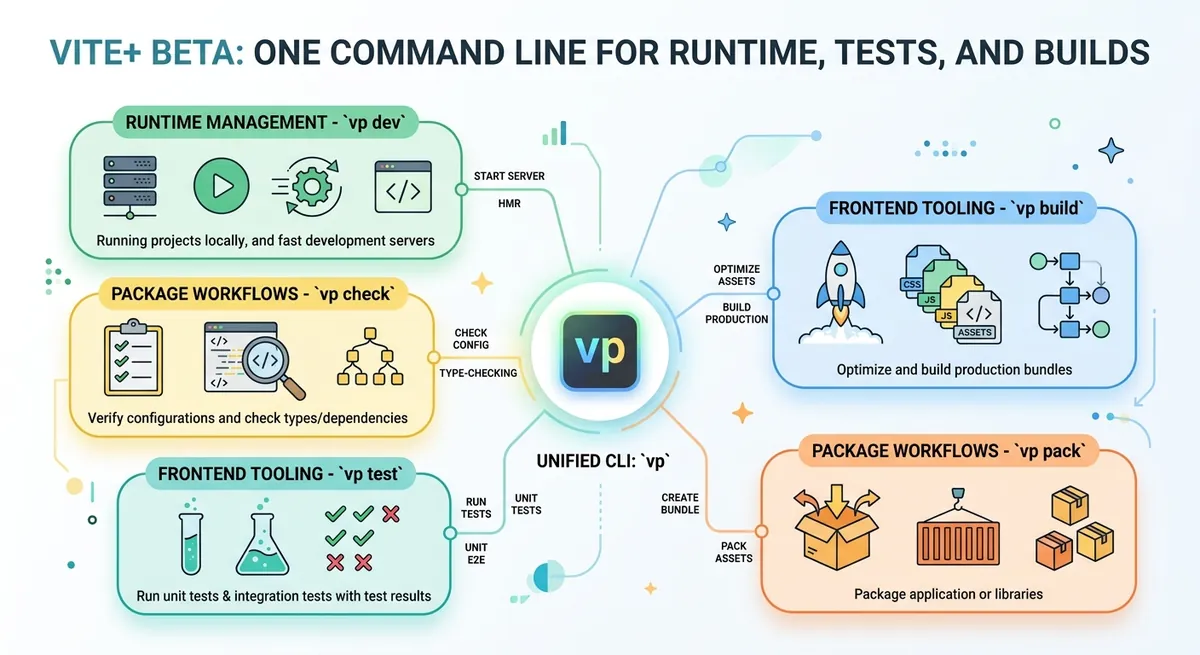
Vite+ is a unified toolchain for web projects. It provides a single CLI (command-line interface) entry point called vp, which then orchestrates everything else.
Here’s the key idea: Vite+ doesn’t replace each best-in-class tool; it integrates them so they behave like one system.
Under the hood, the workflow brings together:
- Vite: a fast development server and production build tool.
- Vitest: a unit test runner.
- Rolldown: a bundler engine.
- tsdown: a bundling setup oriented toward libraries and best practices.
- Oxlint: a linter (code-quality checker).
- Oxfmt: a formatter (code formatting).
Vite+ also includes a built-in task runner (a smarter way to run repeatable commands) so common actions become consistent across projects.
When people ask, “Why not just use Vite and add the rest later?” the answer is that the “later” part is where teams bleed time. Tools change versions, configs diverge, and CI (continuous integration—automated checks run on every commit) drifts away from what developers do locally.
Vite+ aims to keep that drift under control.
The workflow: vp dev, vp check, vp test, vp build
The Vite+ beta centers around a handful of commands. Think of them as the same verbs you already use—dev, check, test, build—but wired to a consistent toolchain.
vp dev: development server with hot reload
Hot module replacement (HMR) is the ability for the browser to update part of the page without a full refresh. When you run vp dev, Vite powers a development server with HMR so changes show up quickly.
The practical payoff is psychological as much as technical: you stay in flow. The loop “edit → see result” stays tight.
vp check: formatting, linting, and type checking
Type checking verifies that your code matches the expectations of types—think of it as a compiler’s logic before you even run the program.
vp check bundles multiple code-quality steps:
- Formatting via Oxfmt.
- Linting via Oxlint.
- Type checking as part of the same “check” pass.
Instead of juggling three separate commands (or worse, three separate config formats), you get one entry point.
vp test: unit tests with Vitest
Unit tests are small automated checks of individual functions or components. vp test uses Vitest to run them.
For beginners, the value is straightforward: tests become “one command away,” which makes it more likely they’re run regularly. For teams, the value is consistency: everyone runs the same test runner with the same expectations.
vp build: production builds with Vite
A production build turns your source code into optimized assets for deployment—typically minified, bundled, and structured for fast loading.
Since vp build uses Vite, you keep the benefits of Vite’s optimized build pipeline while standardizing how teams invoke it.
vp pack: library-oriented bundling with tsdown
Library bundling differs from app bundling. Libraries often need to ship outputs that work well for many consumers, preserve module boundaries, and follow best practices.
vp pack is oriented toward that world using tsdown.
vp run: run scripts with smart caching
A task runner is a system that runs project tasks while managing dependencies and outputs.
vp run stands out because it aims to be cache-aware—it tries to avoid repeating work when inputs haven’t changed. This can significantly speed up iterative workflows and CI.
Caching is one of those “feels magical when it works” features. It relies on tracking what data affected the result.
Why caching is hard—and what smarter caching changes
Caching sounds simple until you try to do it correctly.
In plain terms, a cache needs to answer: “If I ran this command before, and nothing important changed, can I reuse the previous output?” The tricky part is defining “important.” Inputs aren’t only files; they also include environment variables, command parameters, and metadata from the build tool itself.
Vite+ improves caching by combining automatic data tracking with metadata reported by Vite. Automatic data tracking means the system observes which files and signals the build depends on, rather than relying entirely on manual input/output lists.
The result is that cache hits become more reliable—less time wasted on reruns, and fewer “why didn’t it rebuild?” surprises.
Framework-agnostic: it works across kinds of web projects
One of the most important promises in the Vite+ beta is that it’s framework-agnostic.
Framework-agnostic means the approach is not locked to one specific UI framework. Instead, it’s designed to work with different kinds of web projects: CLIs (command-line programs), libraries, and web apps.
That’s a big deal for mixed ecosystems where different teams build different kinds of products.
At the same time, Vite+ does not try to replace the Vite ecosystem. Vite plugins remain Vite plugins. And projects can continue using their package manager of choice under the hood.
In other words, Vite+ is the integration layer—the “glue” that makes a set of tools act like one toolchain.
Migration and adoption: start new, or adopt existing
Vite+ provides two main entry points for adoption:
vp createto start a new project.vp migrateto bring an existing project into the Vite+ workflow.
Migration is where tool unification either succeeds or collapses. It’s not just about installing dependencies; it’s about translating configuration and commands into the new standardized structure.
The beta emphasizes that migration has become more capable—handling many app setups and providing a migration prompt for an agent. That hints at one practical truth: real-world repos rarely have a single “happy path.”
So automation needs to be flexible, not brittle.
From alpha to beta: what changed in practice
The jump from alpha to beta usually signals maturity: fewer breaking edges, better stability, and smoother workflows.
Vite+ highlights several areas of progress:
- Smarter caching so
vp runcan reuse results more safely. - Better migrations so adopting Vite+ in existing setups becomes less of a bespoke exercise.
- Enterprise features, including organization templates that standardize setup across teams.
- Proxy- and custom-CA-aware HTTP, which matters in locked-down corporate environments where outbound network rules and certificate authorities (CAs—trusted entities that validate HTTPS certificates) can differ from local development.
- Cross-platform hardening, improving behavior across major operating systems and shells.
Underneath those points is a single theme: making the “same command” promise hold up not only on a developer laptop, but also inside CI, behind proxies, on different shells, and across many repos.
So what does Vite+ change day to day?
The most immediate change is emotional as much as technical: your brain stops switching contexts between repositories.
When every repo has different scripts—npm run dev, yarn start, pnpm turbo dev, plus a separate test command—the friction accumulates. In contrast, Vite+ aims for one workflow vocabulary:
vp devto run the dev server.vp checkto enforce formatting, linting, and types.vp testfor unit tests.vp buildfor production output.vp packfor library distribution.vp runfor cached task execution.
In teams, this also means CI can mirror local behavior more closely. That reduces the dreaded gap where “it works on my machine.”
Adoption hints: why this matters beyond one team
When a tool becomes broadly adopted, it’s often because it solves a shared pain.
The beta announcement notes large-scale dependents across many public repositories, spanning projects like LLM app platforms, CSS tooling, editor components, Next.js-compatible layers, backup automation, and more.
That variety reinforces the framework-agnostic promise: even if the runtime and UI technology differ, the integration layer still aims to offer a consistent workflow.
And when performance matters, integration matters too—because faster builds and reliable caching change how often people can iterate without waiting.
Conclusion: a unified toolchain you can learn once
Vite+ Beta is best understood as a workflow unification effort. It gives you a single CLI entry point (vp) that orchestrates a modern web toolchain: development server, formatting, linting, type checking, testing, building, and library packing.
The real win isn’t that any one tool is new—it’s that the combination becomes consistent. That consistency reduces setup time, helps keep tool versions aligned, and makes local development and CI feel like the same path.
If you’ve ever felt tired of repeating “toolchain assembly,” Vite+ is a direct answer: stop rebuilding the wheel per repository, and start using one tested stack across projects.
Comments (0)
No comments yet. Be the first to respond!
Leave a Comment
Your comment will be visible after review.