Reviving Java Applets and Building New Math Visualizations with Coding Agents
 by ahsan
July 12, 2026
8 min read
by ahsan
July 12, 2026
8 min read
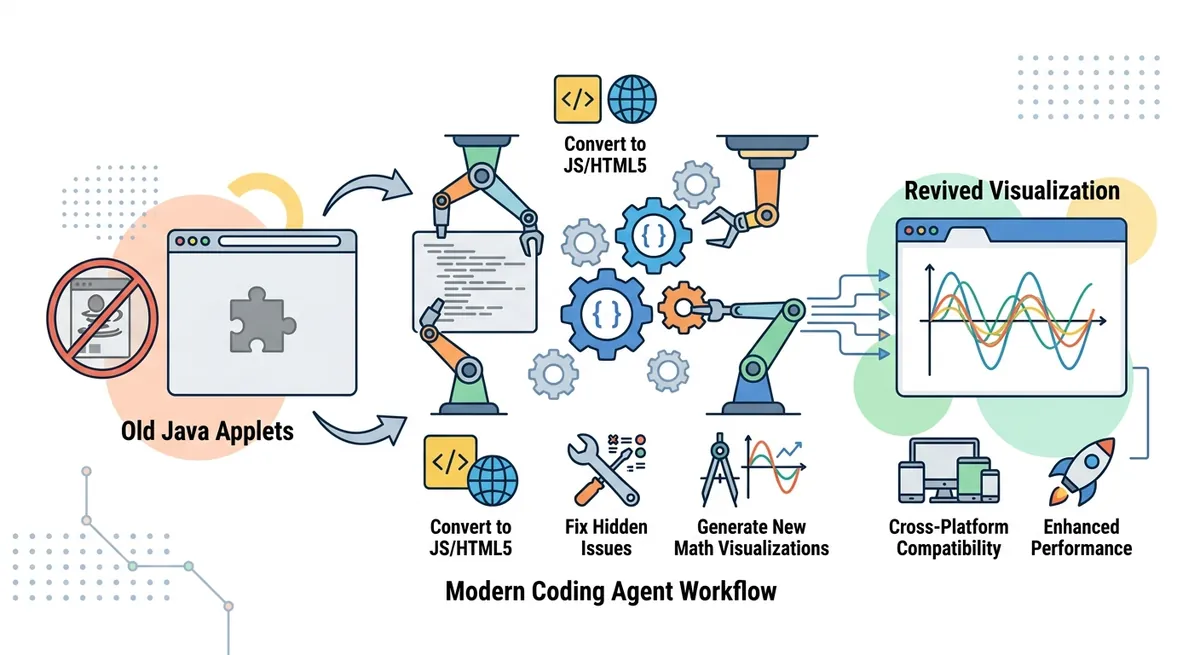
The day a math applet stopped working
You know the feeling: you open a familiar webpage from years ago, and instead of a crisp animation you get a dead panel, an error, or nothing at all. For math, that kind of failure is more than cosmetic—interactive visuals are often where ideas “click.”
That’s what makes the story here feel both practical and emotional: old Java applets (small embedded programs that used to run inside a browser) can quietly die when the browser stops supporting the technology they depend on. The good news is that this is now a solvable maintenance problem, and not only by hand.
In 2026, modern coding agents—AI systems designed to edit and generate code—can help port legacy interactive apps to today’s web stack, often fast enough to make the migration feel almost like “time travel.”
Why Java applets broke in modern browsers
Java applets worked because browsers used a plugin system: a way to let third-party runtime code (in this case, Java) execute inside the page. A key piece was NPAPI, short for Netscape Plugin Application Programming Interface—the older browser plugin interface that many legacy plugins relied on. Over time, major browsers phased out NPAPI, and the result was predictable: applets became unable to run. (support.mozilla.org)
On the Java side, the platform also started backing away from the applet model. For example, OpenJDK’s JEP 289 explicitly describes deprecating the Applet API because browser vendors were removing support for Java browser plugins, with late-2015 timelines and related deprecations becoming official. (openjdk.org)
Then the ecosystem tightened further. Oracle’s own updates described removal of the required APIs for standards-based plugin support in Firefox 52 (March 2017), illustrating how quickly this migration pressure became real-world for users. (blogs.oracle.com)
By the time you’re reading this, you should treat “Java applet in a modern browser” as a historical artifact, not an engineering target. Even if the Java code still “exists,” it’s likely stuck behind multiple layers of unsupported runtime behavior.
What “deprecation” means (and why it matters)
Deprecation is a platform term meaning “keep working for now, but stop relying on it.” A deprecated feature may still function, but it’s not guaranteed to survive. That’s exactly why applets went from working → flaky → unusable, without any single catastrophic “break” date.
So the migration mindset becomes: preserve the idea, not the binary format. The goal is to keep the visualization faithful to the math, while translating the implementation to modern web technologies.
Migration in three layers: storage, rendering, and interaction
Porting an old applet isn’t only a language change; it’s three separate repairs happening at once.
1) Storage: moving from “code embedded in a plugin” to a web page
In a Java applet world, the browser loaded a Java archive and asked a plugin runtime to execute it. In a modern web world, the browser executes web-native code such as JavaScript, and the “app” is part of the page itself.
That’s why JavaScript (and often HTML5) becomes the new home for the applet logic.
2) Rendering: replacing “draw by plugin” with Canvas/SVG/WebGL
A typical Java applet might render using Java’s drawing APIs (often AWT/Swing concepts). In modern web terms, rendering usually lands in one of these buckets:
- Canvas: a bitmap drawing surface controlled by JavaScript.
- SVG: vector graphics where elements are part of the DOM (useful for interactive geometry).
- WebGL: hardware-accelerated 3D rendering (not needed for every math visual).
For math visualizations, Canvas and SVG are common because they map cleanly to lines, polygons, and coordinate transforms.
3) Interaction: events instead of plugin callbacks
Java applets often handled mouse input through event handlers tied to the embedded component. In the browser, the same conceptual behavior becomes DOM events such as mousedown, mousemove, and mouseup.
One subtle place bugs hide is drag logic—drag outside the box cases, pointer capture differences, and coordinate conversion errors. Those edge cases can look “minor,” but they determine whether the visualization feels polished.
Coding agents as pair programmers, not magic wizards
A modern coding agent can do something surprisingly human: it can read an existing codebase, propose a rewrite plan, generate replacement files, and iterate based on compilation errors. In practice, it behaves like an eager pair-programmer that never gets tired.
The important engineering framing is: the agent generates code; the developer ensures correctness. In a porting job, correctness isn’t only “does it compile?”
For math apps, correctness means:
- The geometry and coordinate transforms are faithful.
- The interaction model matches the original intent.
- Visual output is stable across browsers and screen sizes.
That last point matters because “works on my machine” can still be true for years—until someone drags outside the expected region.
Why this can still be safe for non-critical visuals
Not every bug is equal. In a critical system, a wrong answer is unacceptable. But for secondary visual aids—things meant to accompany a proof—the risk profile changes. A small UI glitch doesn’t destroy the argument; it just changes how comfortably readers explore it.
A good migration process still flags suspicious behavior, but the engineering emphasis becomes triage: prioritize mathematical correctness and interaction stability over cosmetic perfection.
Porting old applets to JavaScript: keeping the math intact
When porting legacy visualizations, the biggest risk is that the rendering model changes while the math accidentally doesn’t. Java’s coordinate system, event timing, and drawing primitives don’t match JavaScript one-to-one.
So the migration path often looks like this:
- Identify the core math computation (the part that decides where points/lines go).
- Translate the drawing calls into Canvas/SVG primitives.
- Translate the interaction state machine (what happens on click vs. drag vs. release).
A useful outcome of this approach is that the agent can surface bugs in the old implementation. Even when the “port succeeds,” the rewrite can force a careful re-reading of assumptions.
And that’s where coding agents shine: they’re good at repetitive refactoring and mechanical translation. They’re also the fastest way to get the first working prototype—enough to start comparing outputs visually.
Building new visualizations: “Inkscape in Minkowski space”
Porting legacy code is only half the story. Once you have a working pipeline—repo → agent → modern web app—you can start generating new projects.
The compelling idea in this case is a relativity visualization: Minkowski space (the mathematical stage where spacetime is represented with a time axis and space axes) deserves interactive diagrams. The author’s original plan dates back to an era before Inkscape existed, but the conceptual tool was “Inkscape-like editing,” except for spacetime rather than vector illustration.
Why mention Inkscape? Because it’s a helpful analogy for the interaction goal: Inkscape’s initial release was in November 2003, and it popularized the feeling of drawing and editing vector objects directly on a canvas. (en.wikipedia.org)
A coding agent can accelerate the “vibe coding” phase: sketch an editing workflow, generate the UI components, wire up coordinate transforms, and iterate until the result matches the conceptual vision.
In modern web terms, the workflow usually ends up as:
- Represent diagram primitives (events, segments, axes) as data.
- Render them as SVG or Canvas objects.
- Allow users to manipulate control points with drag events.
- Recompute derived geometry (e.g., light cones, interval structures) on each interaction tick.
The key technical ingredient is the same as in any interactive graphics app: a clean separation between state (what the diagram “is”) and rendering (what the diagram “looks like”). Coding agents tend to propose this separation naturally once asked to build maintainable structure.
When you shouldn’t port: the fallback ecosystem
Porting is ideal when the code is meant to run in a browser. But sometimes an organization needs a stopgap to keep legacy content accessible.
One workaround that has existed is CheerpJ, described as a browser-based runner that enables running Java applets without needing a Java plugin installation. (labs.leaningtech.com)
That approach can help when you must keep old behavior quickly. But it can also carry tradeoffs: performance, browser extension requirements, and uncertainty about long-term maintainability. For educational and interactive visualization work that benefits from iteration, a direct JavaScript/HTML5 rewrite is often the more sustainable path.
The real engineering checklist for agent-generated apps
Even when a coding agent “gets it right,” interactive graphics have failure modes that are easy to miss in the first pass.
A practical checklist—especially for math visualizations—tends to include:
- Boundary behavior: dragging across canvas edges, resizing, and window zoom.
- Numerical stability: rounding errors that shift points over time.
- Interaction consistency: the diagram should respond in a way that matches its mental model.
- Visual invariants: expected symmetries and constraints should always hold.
This is how you turn LLM-generated code from “demo-ready” into “trustworthy enough to publish.” It also explains why migration can be a net win: the process encourages revalidation of both old and new behaviors.
Conclusion: modern coding agents as a preservation tool
Java applets failed because browsers and the Java ecosystem moved on: plugin technologies like NPAPI were retired, and the Applet API was deprecated as browser support vanished. (support.mozilla.org)
Modern coding agents offer a different kind of leverage: they can port legacy interactive visualizations to JavaScript-based web apps and help generate new diagram tools that match long-standing conceptual goals. The result is not nostalgia for old code—it’s preservation of the underlying ideas, delivered in a form that works for today’s browsers.
In short, the “old and new apps” pattern becomes a repeatable workflow: translate the technology, keep the math faithful, and use careful human validation to catch the subtle edges where drag events and rendering details love to hide.
Comments (0)
No comments yet. Be the first to respond!
Leave a Comment
Your comment will be visible after review.